Inhouse Media Production Workflow System
Technische Dokumentation & Workflow-Handbuch, Version 2.6.3, 17.07.2026
Dieses System bildet das zentrale Nervensystem für das digitale Asset-Management, das High-End-Mastering und die Distributions-Vorbereitung der Media Coding Co., Ltd. Es wurde als maßgeschneiderte Inhouse-Lösung entwickelt, um wiederkehrende, rechenintensive Postproductions- und Transcoding-Prozesse vollautomatisch, fehlerfrei und plattformkonform abzuwickeln.
Durch die tiefe Integration der direkten Hardware-Beschleunigung via NVIDIA NVENC Engine verbindet das Tool maximale Verarbeitungsgeschwindigkeit mit den kompromisslosen Qualitätsansprüchen professioneller Mastering-Standards.
Das im Auftrag der „Media Coding Co., Ltd.“ programmierte Workflow-Tool wurde inhouse konzipiert und entwickelt. Die Entwicklungszeit betrug ~3 Monate. Die Testphase ist abgeschlossen und das Tool befindet sich seit ca. einem Monat in produktiver Nutzung. Natürlich werden weitere Module, wie das Packaging für weitere große Plattformen (Google, iTunes, etc.), sowie der kontinuierliche Ausbau von weiteren AV-Edits folgen.
🗂 Inhaltsverzeichnis der Pipeline-Module
Das System ist in der GUI in zwei logische Hauptbereiche (Hauptanwendung und Produktionstools) unterteilt:
Haupt-Pipeline (Distributions- & Mastering-Workflow):
- Source-Check / Audio Tagging / File Search: Das Ingest-Tor des Systems zur Metadaten-Analyse und Dateisuche.
- Mastering (mod_transcoding): Die Core-Encoding-Engine für Video-Target-Profile (Amazon, Silverline, DVD, Blu-ray) und Audio-FPS-Wandlungen.
- QC (Quality Control): Die automatisierte und manuelle Überprüfung der erzeugten Assets auf Compliance-Richtlinien.
- Quarantine (Fails): Isolationsbereich für fehlerhafte Ingest-Files oder QC-Fails (z. B. bei Pegel-Überschreitungen).
- Delivery: Die finale Auslieferungs-Schnittstelle zu den Servern der Lizenznehmer und VOD-Plattformen.
Zusatz- & Produktionstools:
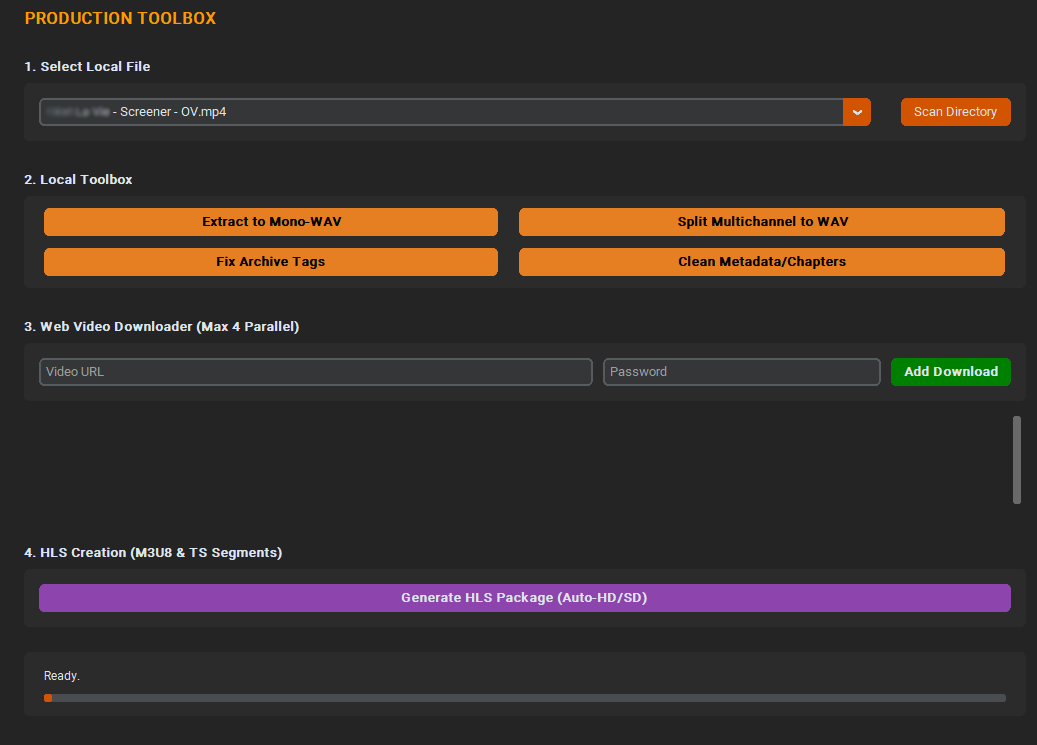
- Toolbox (mod_tools): Lokale Produktionshelfer (Audio-Extractor, Multichannel-Splitter, Metadaten-Stripper und Parallel-Web-Downloader).
- Archiving: Archivierung der Source- und transkodierten Dateien.
- Broadcast Creation: Dedizierte Profil-Generierung für TV-Sender und lineare Broadcaster.
Inhouse Media Production Workflow System
Technical Documentation & Workflow Manual, Version 2.6.3, July 17, 2026
This system forms the central nervous system for digital asset management, high-end mastering, and distribution preparation at Media Coding Co., Ltd. It was developed as a custom in-house solution to handle repetitive, compute-intensive post-production and transcoding processes fully automatically, flawlessly, and platform-compliant.
Through the deep integration of direct hardware acceleration via the NVIDIA NVENC Engine, the tool combines maximum processing speed with the uncompromising quality demands of professional mastering standards.
The workflow tool, programmed on behalf of "Media Coding Co., Ltd.", was designed and developed in-house. The development time was ~3 months. The testing phase has been completed, and the tool has been in active production use for about a month. Naturally, further modules, such as packaging for other major platforms (Google, iTunes, etc.), as well as the continuous expansion of additional AV edits, will follow.
🗂 Table of Contents of the Pipeline Modules
The system's GUI is logically divided into two main areas (Main Application and Production Tools):
Main Pipeline (Distribution & Mastering Workflow):
- Source-Check / Audio Tagging / File Search: The system's ingest gateway for metadata analysis and file searching.
- Mastering (mod_transcoding): The core encoding engine for video target profiles (Amazon, Silverline, DVD, Blu-ray) and audio FPS conversions.
- QC (Quality Control): The automated and manual verification of generated assets against compliance guidelines.
- Quarantine (Fails): Isolation area for faulty ingest files or QC fails (e.g., in case of audio peak violations).
- Delivery: The final distribution interface to licensees' servers and VOD platforms.
Additional & Production Tools:
- Toolbox (mod_tools): Local production helpers (Audio Extractor, Multichannel Splitter, Metadata Stripper, and Parallel Web Downloader).
- Archiving: Archiving of source and transcoded files.
- Broadcast Creation: Dedicated profile generation for TV stations and linear broadcasters.
📊 Modul A: Source-Check / Audio Tagging / File Search
Zweck: Dieses Modul steuert den Ingest-Prozess. Es scannt den definierten Watchfolder und analysiert importierte Videofiles in Millisekunden.
📊 Module A: Source-Check / Audio Tagging / File Search
Purpose: This module controls the ingest process. It scans the defined watch folder and analyzes imported video files in real-time.
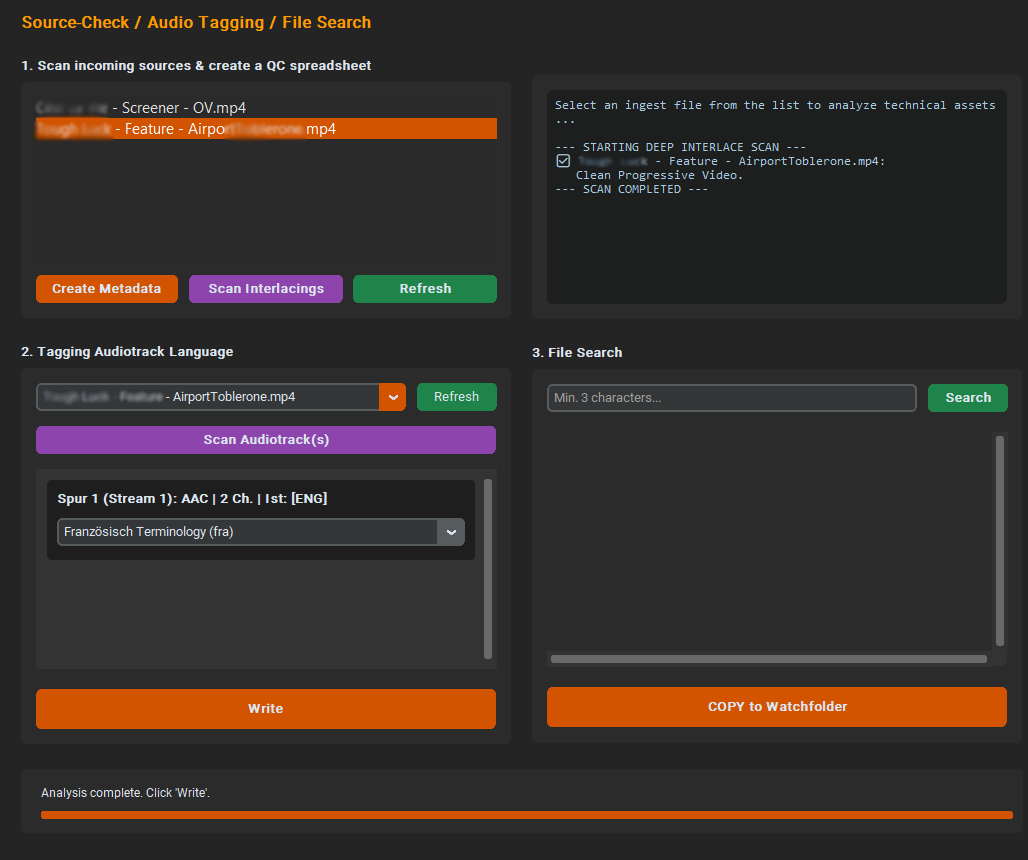
Kernfunktionen:
- Live-Metadaten-Auslesung: Es werden Codecs, Auflösungen, Frameraten und exakte Audio-Layouts visuell in einer Konsole ausgegeben.
- Eine Prüfung auf Interlaced wurde integriert. Es passiert, das MediaInfo einen Fim als "progressiv" ausweist, der Film aber interlaced ist. Um dies zu erkennen, wurde zum einen eine Prüfung im Sourcecheck eingebaut, zum anderen ein Fix im Mastering implementiert. Die Generierung der Dateinamen wurde auf eine entsprechendes Naming erweitert. Hinter der FPS-Rate ersceint jetzt ein "p" oder ein "i".
- Einen Head-Check der ersten 30 Sekunden, der Video-Schwarzbild und Audio-Stille exakt auf die Millisekunde auswertet und direkt sagt, was zuerst da ist.
- Einen Tail-Check der letzten 30 Sekunden, der prüft, ob Video und Audio exakt gleich lang sind, sowie noch Blackframes nach dem letzten Frame/Ton folgen.
- Automatisierte Ingest-Warnungen: Das Tool verfügt über eine Hintergrund-Erkennung, die typische Mastering-Fehler (wie z. B. qualitätsmindernde Windowbox- / Letterbox- / Pillarbox-Kombinationen) vorab beim Datei-Scan melden. Die Ausgabe des Ergebnisses erfolgt im xlsx-Format (Excel).
- Audio-Tagging: Automatische Erkennung und Zuweisung von Sprachspuren (Standard-Präferenz: Deutsch/GER) für den nachgelagerten Workflow. Unterstützten Dateiformaten kann so der korrekte Sprachtag zugewiesen werden. Derzeit sind 23 der am häufigsten vorkommenden Audiosprachen eingebaut.
- Suchfunktion: Unter Zuhilfenahme einer Indizierung des gesamten Massenspeicherbereiches, wird in Bruchteilen einer Sekunde eine Volltextsuche (ab 3 Buchstaben) vorgenommen. Gefundene Dateien können per Klick in den Watchfolder zur weiteren Bearbeitung übernommen werden.
Core Functions:
- Live Metadata Extraction: Codecs, resolutions, frame rates, and exact audio layouts are displayed visually in a console.
- In addition, an interlaced check has been integrated. Sometimes 'MediaInfo' identifies a movie as “progressive,” even though the movie is actually interlaced. To detect this, a check has been added to the source check, and a fix has been implemented in the mastering process. File name generation has been expanded to include appropriate naming conventions. A "p" or an "i" now appears after the FPS rate.
- A head check of the first 30 seconds that analyzes video black frames and audio silence down to the millisecond and immediately indicates which occurs first.
- A tail check of the last 30 seconds that verifies whether the video and audio are exactly the same length, and whether any black frames follow the last frame or sound.
- Automated Ingest Warnings: The tool features background detection that reports typical mastering errors (e.g., quality-degrading windowbox / letterbox / pillarbox combinations) in advance during the file scan. The output is generated in xlsx (Excel) format.
- Audio Tagging: Automatic detection and assignment of language tracks (Standard preference: German/GER) for the downstream workflow. The correct language tag can be assigned to supported file formats. Currently, 23 of the most common audio languages are integrated.
- Search Function: Utilizing an index of the entire mass storage area, a full-text search (from 3 characters) is performed in fractions of a second. Found files can be transferred to the watch folder for further processing with a single click.
🎬 Modul B: Mastering
Die Core-Transcoding-Engine zur Generierung spezifikationskonformer Master-Files. Das Modul unterscheidet zwei Betriebsmodi:
1. Video-Workflow (Hardware-Accelerated Transcoding/Encoding)
🎬 Module B: Mastering
The core transcoding engine for generating specification-compliant master files. The module distinguishes between two operation modes:
1. Video Workflow (Hardware-Accelerated Transcoding/Encoding)
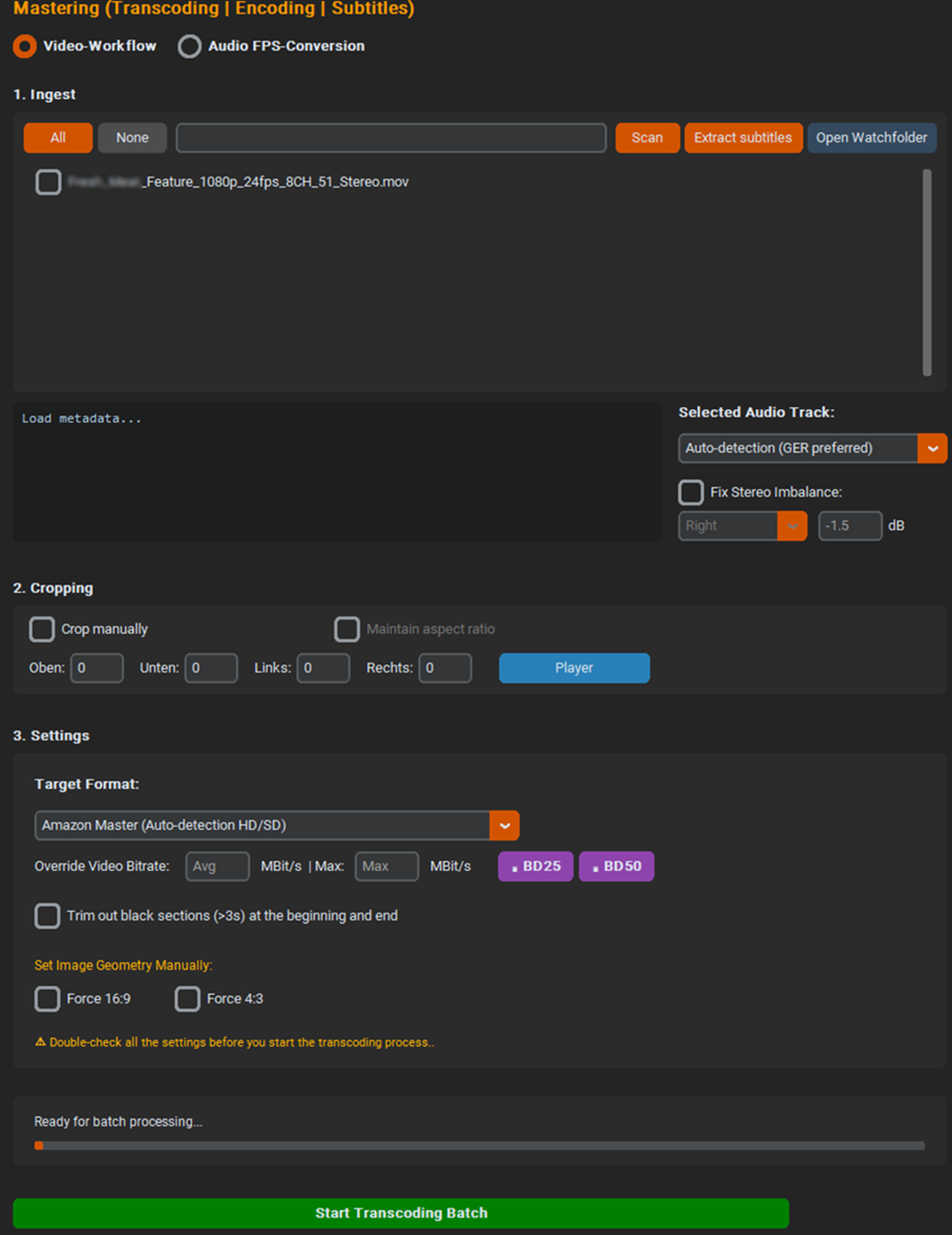
- Amazon Master (Auto / Force HD / Force SD): Generiert CBR-codierte High-Bitrate-Files (15 Mbit für SD, 30 MBit/s für HD) für Amazon Prime Video VOD-Ingest.
- Intelligenter Dead-Space-Scan: Das Tool nutzt die Regex-Analyse aus dem Source-Check, um die exakte Start- und Endzeit zu ermitteln.
- Die "Was-war-zuerst-da"-Regel: Die Funktion vergleicht die Länge des Schwarzbildes mit der Länge der Audio-Stille. Sie nimmt automatisch den kürzeren Wert. Wenn das Bild z.B. 4 Sekunden schwarz ist, der Ton aber schon nach 1 Sekunde anfängt, schneidet das Tool genau 1 Sekunde ab, um den Ton nicht zu killen.
- Nach dem sauberen Schnitt injiziert das Tool zwei Filter, die exakt 1.000 Millisekunden normiertes Schwarzbild und digitale Stille an Kopf und Tail eines Videos schneiden.
- Silverline Master: Erzwingt ein Full-HD-Encoding in 1080p25 mit 17 MBit/s CBR und integrierter Audio-Lautheitsanpassung auf exakt -27 LUFS.
- DVD PAL Master: Erzeugt über ein hochpräzises 2-Pass-Verfahren vollkompatible MPEG-2-Elementarstreams (.m2v & .ac3) für das DVD-Authoring.
- Blu-ray Master (H.264 VBR): Erzeugt spezifikationskonforme .h264-Videostreams im „bluray-compat“-Modus, wahlweise mit Dolby Digital oder mit DTS-Audio.
- Amazon Master (Auto / Force HD / Force SD): Generates CBR-encoded high-bitrate files (15 Mbit/s for SD, 30 Mbit/s for HD) for Amazon Prime Video VOD ingest.
- Smart Dead Space Scan: The tool uses the regex analysis from the Source Check to determine the exact start and end times.
- The "Which Came First" Rule: The feature compares the duration of the black screen with the duration of the audio silence. It automatically selects the shorter value. For example, if the screen is black for 4 seconds but the audio starts after just 1 second, the tool trims exactly 1 second to avoid cutting off the audio.
- After the clean cut, the tool applies two filters that insert exactly 1,000 milliseconds of standardized black screen and digital silence at the beginning and end of a video.
- Silverline Master: Forces Full HD encoding in 1080p25 with 17 Mbit/s CBR and integrated audio loudness adjustment to exactly -27 LUFS.
- DVD PAL Master: Creates fully compatible MPEG-2 elementary streams (.m2v & .ac3) for DVD authoring via a highly precise 2-pass process.
- Blu-ray Master (H.264 VBR): Creates specification-compliant .h264 video streams in "bluray-compat" mode, available with either Dolby Digital or DTS audio.
🖩 BD25 / BD50 Bitrate Calculator: Ein mathematisch optimierter Algorithmus zur exakten Berechnung der VBR-Bitrate. Er kalkuliert basierend auf der addierten Gesamtlaufzeit aller ausgewählten Assets (inkl. Trailer/Bonus) ein striktes Maximalbudget von 21,0 GiB für eine BD25 (bzw. 43,0 GiB für eine BD50) für die reinen Video- und Audio-Nutzdaten. Dadurch bleibt auf der jeweiligen Disc ein massiver, sicherer Puffer (über 2,2 GiB bei BD25 / ca. 3,6 GiB bei BD50) für komplexe Menüstrukturen, Subpictures und den UDF 2.50 Muxing-Overhead frei. Authoring-Abbrüche wegen Platzmangel im finalen Build-Prozess werden so physikalisch und verlässlich ausgeschlossen.
🖩 BD25 / BD50 Bitrate Calculator: A mathematically optimized algorithm for calculating the exact VBR bitrate. Based on the total added runtime of all selected assets (incl. trailers/bonus), it calculates a strict maximum budget of 21.0 GiB for a BD25 (or 43.0 GiB for a BD50) strictly for video and audio payload. This guarantees a massive, secure buffer (over 2.2 GiB for BD25 / approx. 3.6 GiB for BD50) on the respective disc for complex menu structures, subpictures, and the UDF 2.50 muxing overhead. Authoring aborts due to a lack of storage space during the final build process are physically and reliably prevented.


Geometrie- & Image-Funktionen:
- Manuelles Cropping: Pixelgenaues Abschneiden von Rändern mit optionaler Kopplung zur Beibehaltung des Seitenverhältnisses und Live-Player-Vorschau.
- Force Geometry: Erzwingen von festen 16:9 oder 4:3 Seitenverhältnissen inklusive automatischem Black-Padding (Pillarbox/Letterbox).
- Auto-Trim: Eine Automatik, die Dead-Space am Anfang und Ende intelligent trimmt und exakt 1.0 Sekunden Schwarzbild und Audio-Stille anfügt.
Geometry & Image Functions:
- Manual Cropping: Pixel-perfect cropping of borders with optional coupling to maintain the aspect ratio and a live player preview.
- Force Geometry: Forcing fixed 16:9 or 4:3 aspect ratios, including automatic black padding (pillarbox/letterbox).
- Auto-Trim: An automatic feature that intelligently trims dead space at the beginning and end and adds exactly 1.0 seconds of a black screen and audio silence.

2. Audio FPS-Conversion & Processing
2. Audio FPS Conversion & Processing
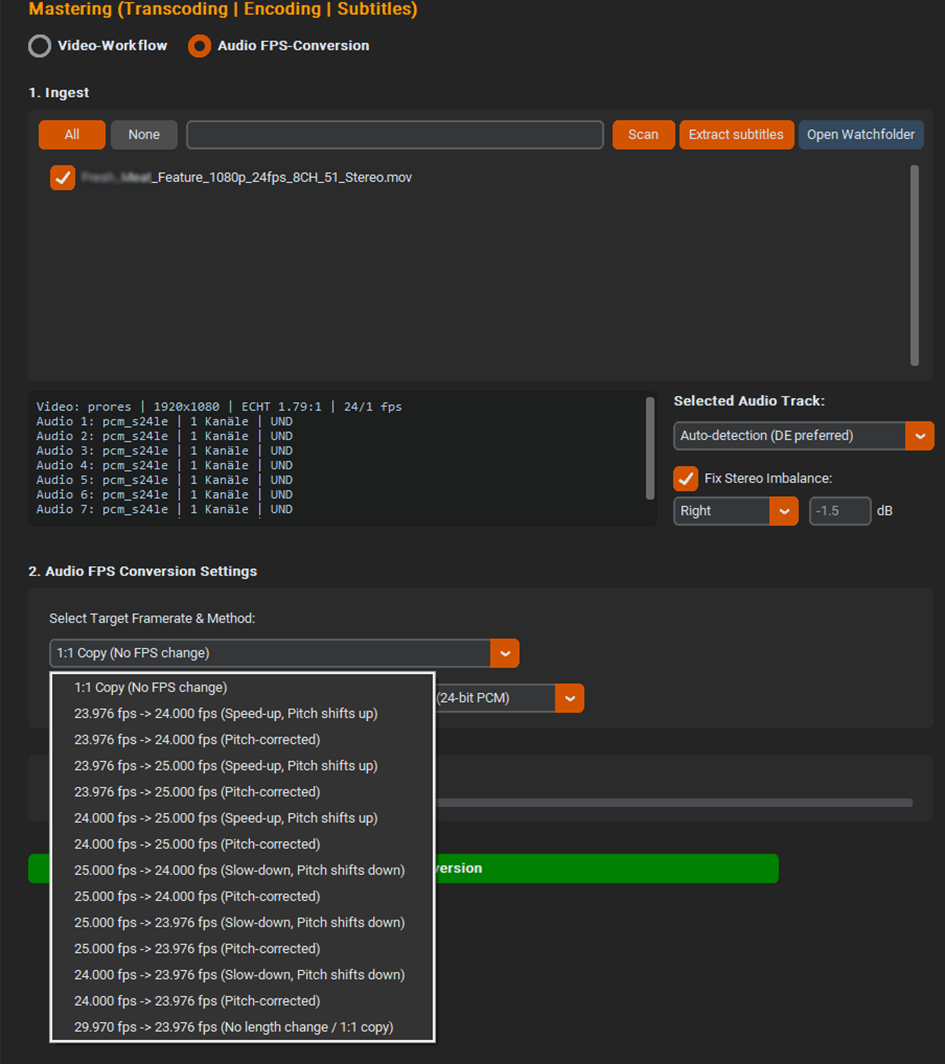
- Framerate-Konvertierung: Ändert die Abspielgeschwindigkeit von Audiostreams (z. B. den berüchtigten 24fps zu 25fps PAL-Speed-Up) wahlweise als klassische Beschleunigung/Verlangsamung (inkl. Pitch-Shift) oder zeit- und pitchkorrigiert via High-Quality-Resampling.
- Stereo Imbalance Fix: Rettungs-Routing für defekte oder asymmetrische Quell-Tonspuren. Ermöglicht das Anheben/Absenken einzelner Kanäle in dB oder das synchrone Spiegeln intakter Spuren (z. B. "Copy L to R" zur Erzeugung eines fehlerfreien Dual-Mono-Signals zur Behebung von Amazon-Compliance-Fails).
- Loudness Normalization: Zuschaltbare Dynamikkompression und Normalisierung nach EBU R128 Target: -23 LUFS / True Peak: -2 dB.
- Export-Formate: WAV (24-bit oder 16-bit PCM unkomprimiert) sowie Dolby Digital (AC3) und Blu-ray-konformes DTS (Digital Theater Systems).
- Framerate Conversion: Changes the playback speed of audio streams (e.g., the notorious 24fps to 25fps PAL speed-up) optionally as classic acceleration/deceleration (incl. pitch shift) or time- and pitch-corrected via high-quality resampling.
- Stereo Imbalance Fix: Rescue routing for defective or asymmetrical source audio tracks. Allows raising/lowering individual channels in dB or synchronously mirroring intact tracks (e.g., "Copy L to R" to create a flawless dual-mono signal to fix Amazon compliance fails).
- Loudness Normalization: Switchable dynamic compression and EBU R128 normalization Target: -23 LUFS / True Peak: -2 dB.
- Export Formats: WAV (24-bit or 16-bit uncompressed PCM), Dolby Digital (AC3), and Blu-ray compliant DTS (Digital Theater Systems).
🔍 Modul C: QC (Quality Control)
🔍 Module C: QC (Quality Control)
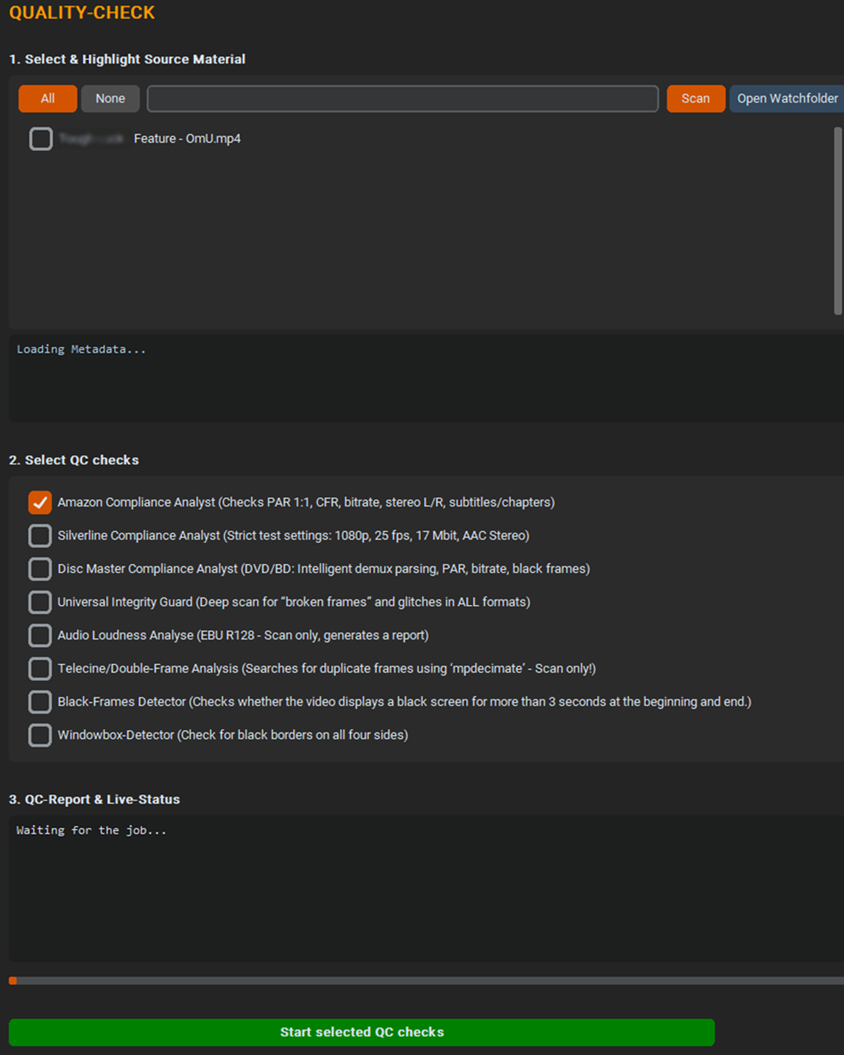
Zweck: Instanz zur automatisierten Abnahme der gemasterten Assets.
Kernfunktionen:
- Pegel- & Audio-Kalkulation: Vollautomatische Überprüfung der Ausgabedateien auf EBU R128 Konformität und Kanalgleichheit.
- Fehler-Reporting: Detektiert Pegel-Verschiebungen (z. B. Audio Imbalance L/R > 1.0dB) und unzulässige Peak-Überschreitungen vor dem finalen VOD-Upload.
Details:
- Amazon Compliance Analyst: Prüft PAR (1:1), konstante Framerate (CFR), konstante Bitrate (CBR), Stereo L/R Balance, testet physikalisch auf "Fake-Progressive" und schlägt Alarm, wenn Untertitel oder Kapitelmarker im Stream versteckt sind.
- Die globale Prüfung. Misst Blackframes und Audio-Stille am Start/Ende und verlangt exakt 1.0 Sekunden (Toleranz: 0.90s bis 1.10s).
- Silverline Compliance Analyst: Prüft Auflösung (1080p), Framerate (25 fps), Bitrate (17 Mbit), AAC-Stereo mit ITU BS-1770-3 / -27 LUFs / Toleranz 0,5 LU / Spitzenwert -6 dBTP.
- Disc Master Analyst: Checkt demuxte Streams (darf kein Audio im Video sein und umgekehrt), prüft DVD-PAR (16:15 / 64:45), minimale Bitrate und sucht nach Frame-Drops, sowie fehlerhaften Schwarzbildern im Vor- und Abspann.
- Universal Integrity Guard: Tiefenscan auf „Broken Frames“ und Störungen in allen Formaten.
- Telecine/Doppelte Frames Analyse: Sucht nach redundanten/doppelten Frames und listet diese ebenfalls in einem eigenen Protokoll auf.(Nur Scan!).
- Audio Loudness Analyse: Scannt das File nach EBU R128 und schreibt ein detailliertes Protokoll als `.txt`-Datei.
- Black Frames Detektor: Prüft auf Schwarzbilder am Anfang und Ende des Films.
- Windowbox-Detektor: Scannt das Video bei 20% der Laufzeit und meldet, ob rundherum schwarze Ränder existieren.
Purpose: The instance for the automated approval of mastered assets.
Core Functions:
- Level & Audio Calculation: Fully automated verification of output files for EBU R128 compliance and channel equality.
- Error Reporting: Detects level shifts (e.g., Audio Imbalance L/R > 1.0dB) and impermissible peak exceedances prior to final VOD upload.
Details:
- Amazon Compliance Analyst: Checks PAR (1:1), constant frame rate (CFR), constant bit rate (CBR), stereo L/R balance, physically tests for “fake progressive,” and raises an alert if subtitles or chapter markers are hidden in the stream.
- The global check. Measures black frames and audio silence at the start/end and requires exactly 1.0 seconds (tolerance: 0.90s to 1.10s).
- Silverline Compliance Analyst: Checks resolution (1080p), frame rate (25 fps), bitrate (17 Mbit), AAC stereo with ITU BS-1770-3 / -27 LUFs / tolerance 0.5 LU / peak value -6 dBTP.
- Disc Master Analyst: Checks demuxed streams (no audio should be present in the video and vice versa), verifies DVD-PAR (16:15 / 64:45), checks for minimum bitrate, and searches for frame drops as well as erroneous black frames in the opening and closing credits.
- Universal Integrity Guard: Deep scan for “broken frames” and artifacts in all formats.
- Telecine/Duplicate Frames Analysis: Searches for redundant/duplicate frames and lists them in a separate log file. (Scan only!).
- Audio Loudness Analysis: Scans the file for compliance with EBU R128 and writes a detailed log as a `.txt` file.
- Black Frame Detector: Checks for black frames at the beginning and end of the movie.
- Windowbox Detector: Scans the video at 20% of its runtime and reports whether there are black borders around the edges.
🚫 Modul D: Failed (Quarantine)
🚫 Module D: Failed (Quarantine)
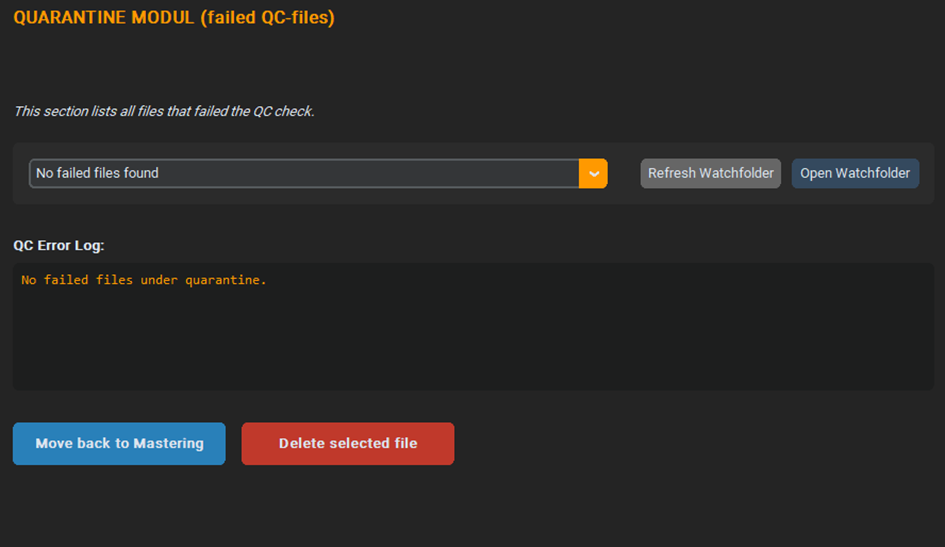
Zweck: Der Isolations- und Sicherheitsbereich des Tools.
Kernfunktionen:
- Automatisches Routing: Schlägt ein Ingest-Scan fehl oder verpasst eine Datei den automatisierten QC-Check, wird das File sofort aus dem aktiven Watchfolder in den Quarantäne-Ordner verschoben, um eine Fehlproduktion im Batch-Transcoding zu verhindern.
- Log-Zuweisung: Speicherung des genauen Fehlerprotokolls (z. B. Fehlercodes oder QC-Berichte) zur schnellen Analyse und manuellen Nachbearbeitung.
- Move back: Verschiebt die Datei zurück in den Mastering-Watchfolder.
- Delete selected File: Löscht die Datei, falls eine Reparatur bzw. ein erneutes Encoding keinen Erfolg bringen würde.
Purpose: The isolation and security area of the tool.
Core Functions:
- Automatic Routing: If an ingest scan fails or a file misses the automated QC check, it is immediately moved from the active watch folder to the quarantine folder to prevent faulty production during batch transcoding.
- Log Assignment: Saves the exact error protocol (e.g., error codes or QC reports) for quick analysis and manual post-processing.
- Move back: Moves the file back into the mastering watch folder.
- Delete selected File: Deletes the file if repair or re-encoding would not be successful.
🚚 Modul E: Delivery
🚚 Module E: Delivery
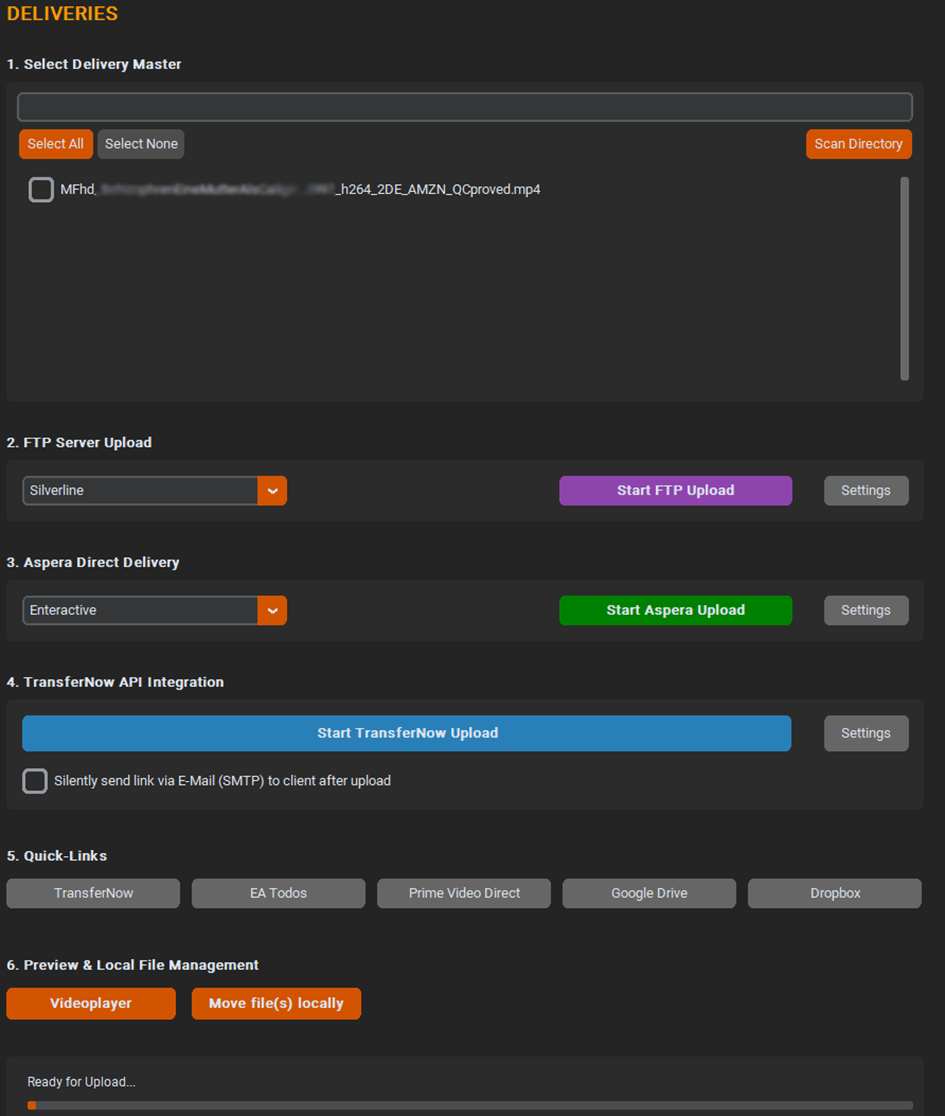
Zweck: Die finale Schnittstelle zum automatisierten Versand der freigegebenen Master-Daten.
Kernfunktionen:
- Aspera- und FTP-Upload: Automatisiertes Verschieben und Übertragen der geprüften Assets in die jeweiligen Zielverzeichnisse oder direkte Server-Strukturen des Endkunden.
- Verlaufsprotokollierung: Übergabe der erfolgreichen Transfers an den globalen System-Logger zur lückenlosen Nachverfolgbarkeit aller Auslieferungen.
Purpose: The final interface for the automated dispatch of approved master data.
Core Functions:
- Aspera and FTP Upload: Automated moving and transferring of the verified assets to the respective target directories or direct server structures of the end customer.
- History Logging: Transfer of successful transfers to the global system logger for seamless traceability of all deliveries.
📦 Archiving
📦 Archiving
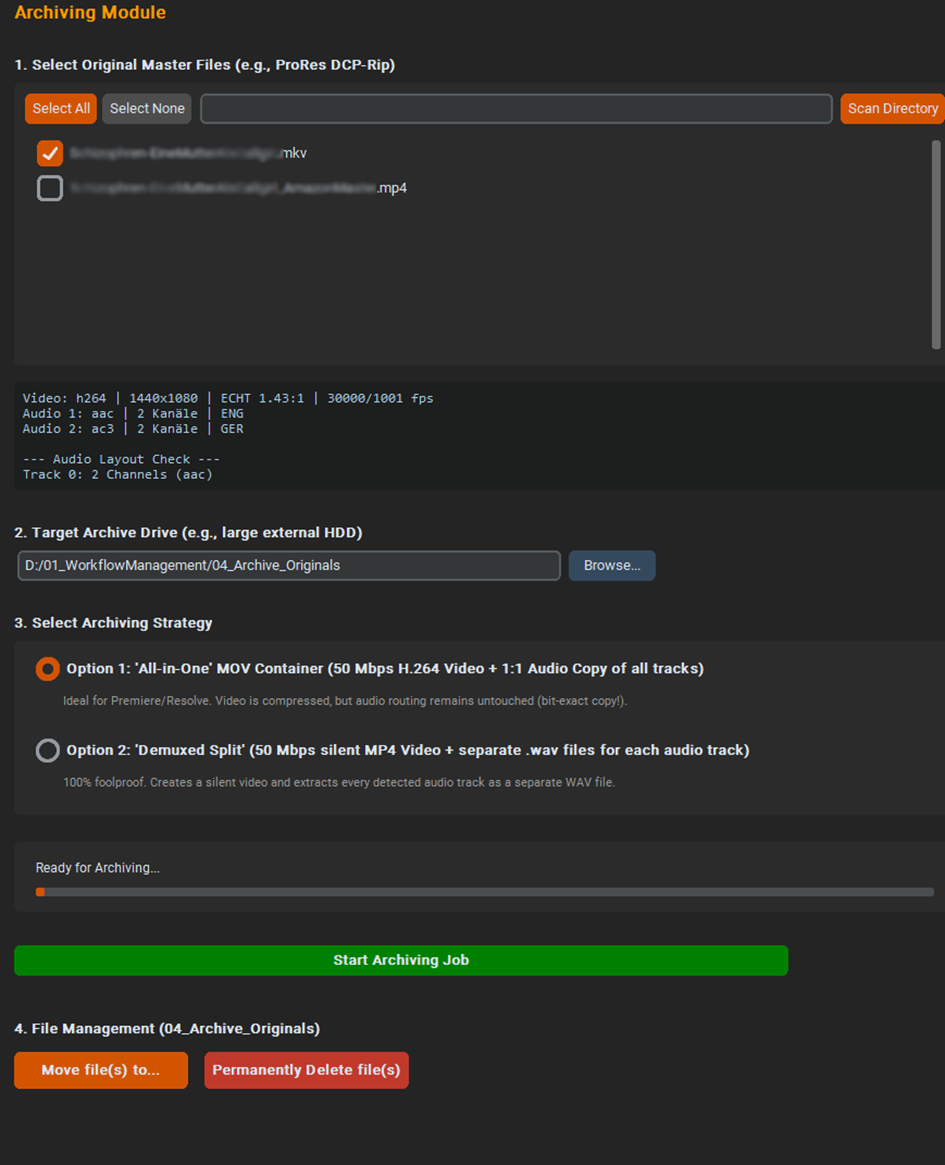
Zweck: Erzeugung von archivtauglichen Dateien, um sie entweder lokal, in eine Cloud oder ins Langzeitarchiv verschoben werden.
Kernfunktionen:
- Originals-Backup: Sicheres und automatisiertes Verschieben der erfolgreich verarbeiteten Originalmedien in das Langzeitarchiv (04_Archive_Originals).
- Backup-Edits: Vorbereitung des Asset-Status für Migrations- und Synchronisations-Skripte (z. B. zur Verwaltung von Cloud-Speicher-Kontingenten).
Purpose: Creation of archive-ready files to be moved locally, into any cloud, or into the long-term archive.
Core Functions:
- Originals Backup: Secure and automated moving of successfully processed original media into the long-term archive (04_Archive_Originals).
- Backup Edits: Preparation of the asset status for migration and synchronization scripts (e.g., for managing cloud storage quotas).
📺 Broadcast Creation
📺 Broadcast Creation
Zweck: Generierung von Sende-Mastern für lineare TV-Stationen und Broadcaster.
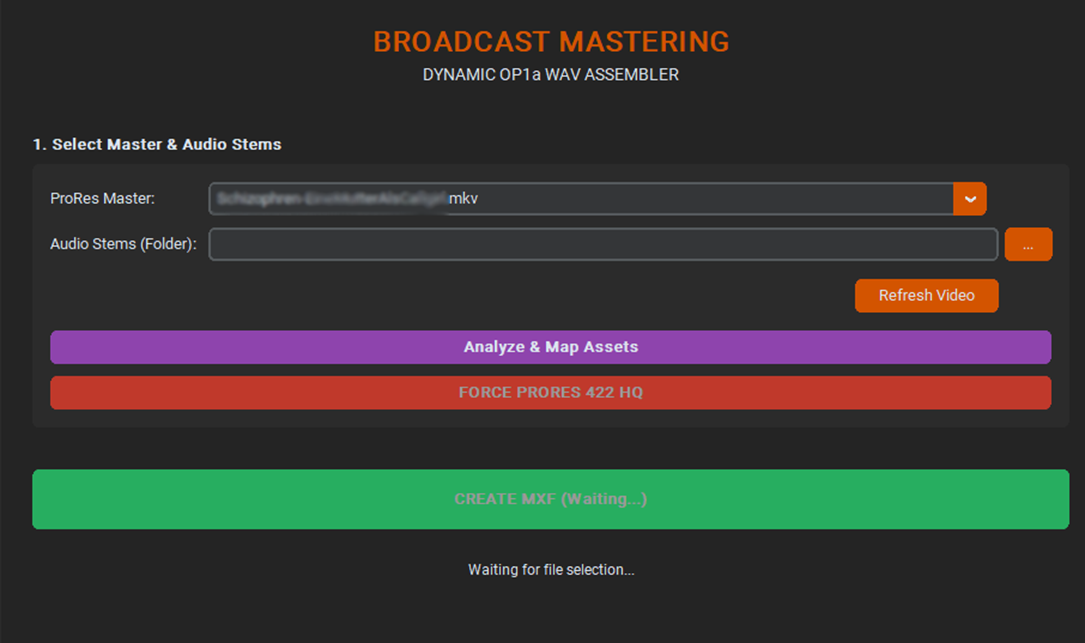
Kernfunktionen:
- Spezifische Profil-Vorgaben: Exportiert Video- und Audiostreams nach den exakten Parametern klassischer Sendeabwicklungen (Interlaced-Formate, feste Audio-Kanalbelegungen).
- Um saubere Sendefiles zu erzeugen, ist zwingend ein ProRes-Video erforderlich. Liegt dieses nicht vor, wird eines erstellt, bevor das Sendefile erstellt wird. Loudnessvorgaben, wie R128, werden berücksichtigt und in einem separaten Protokoll mitgeliefert.
Purpose: Generation of broadcast masters for linear TV stations and broadcasters.
Core Functions:
- Specific Profile Presets: Exports video and audio streams according to the exact parameters of classic broadcast playouts (interlaced formats, fixed audio channel assignments).
- To create clean broadcast files, a ProRes video is strictly required. If not available, one is created before the broadcast file is generated. Loudness specifications, such as R128, are taken into account and provided in a separate report.